NOTICE
WELCOME TO PC ZONE ARC • BNMU UG SEMESTER VI ADMISSION GOING ON
Showing posts with label Windows. Show all posts

How To Check If Windows 10 Is Genuine or Not? Best Trick

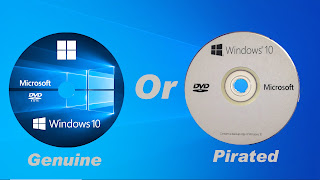
Your Windows Genuine Or Pirated


Trick-1

Check If Windows 10 Is Genuine or Not via Command

Generally, you will check for products ID and license status of the operating system by right-clicking on This PC and choosing Properties.

In the pop-up window, you will see information about Windows 10 such as Windows edition, RAM, computer name, processor type, etc. Scroll down and then you can see if Windows 10 is activated in the Windows activation section. If so, the product ID is given.

But there is one thing you should note. Whether Windows 10 is genuine or activated, the status looks like the same in the system properties window. So, how to check if Windows 10 is original or not? How to check genuine Windows 10? You can use Command Prompt to validate Windows 10.

Step 1: Click Windows logo and R key on the keyboard in Windows 10 to open the Run dialog.

Step 2: Type Cmd And Enter Key

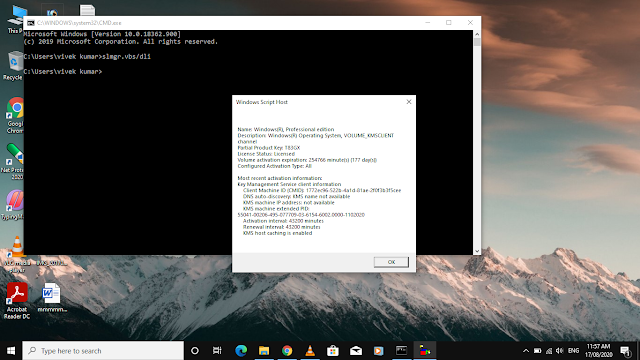
Step 2: Type slmgr.vbs /dli and press Enter key to display license information. Here slmgr stands for Software License Manager and the .vbs means Visual Basic Script.

These Screen Your Windows is Genuine
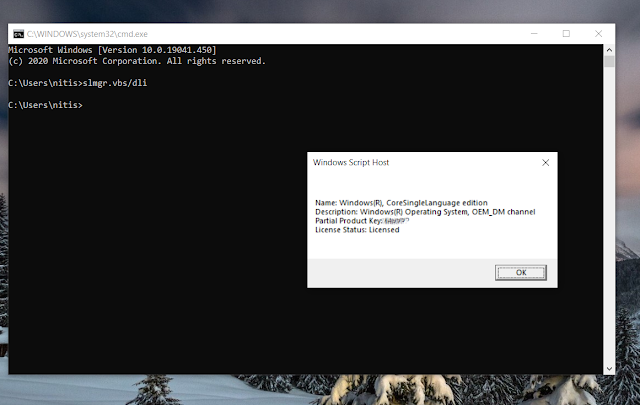

This Is Not Genuine Windows 10


Trick 2: 

Check If Windows 10 Is Genuine via Settings

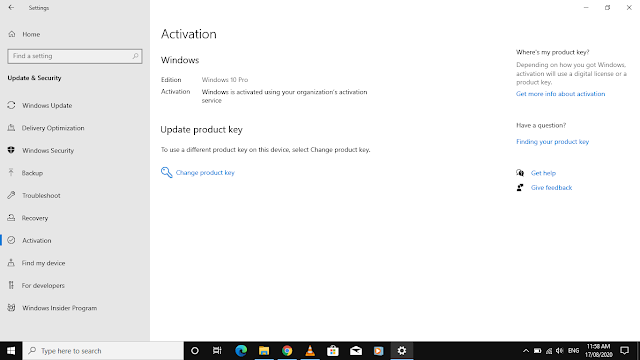
In addition, you can perform Windows genuine validation via Settings. Just go to the Start menu, click Settings, then click Update & security. Then, navigate to the Activation section to see if the OS is activated. If yes, and it shows "Windows is activated with a digital license ", your Windows 10 is genuine.
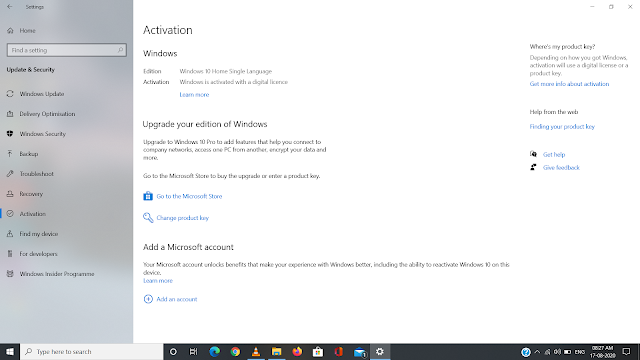

This Is Not Genuine Windows 10


How To Access Android App In Pc

 Bluestacks


Bluestacks is the most mainstream of all Android emulators. There are several reasons for that. For starters, it’s compatible with Windows and Mac. It was also one of the first that worked really well that still gets regular updates. The emulator targets mobile gamers. There is a stigma with Bluestacks because it can feel a little bloated at times. Bluestacks 4 (launched in 2018) aimed to fix that with mixed results. It also includes key-mapping and settings for many games installed. That should help make things much easier. It’s one of the heaviest emulators on the list. However, it also has the most features for better or for worse. Bluestacks also made the MSI App Player, another excellent emulator that some believe works better than vanilla Bluestacks. You can try either one, they are both by Bluestacks.

Download Bluestack Ofline Installer

Online Install 32/64 Bit
Ofline Installer

  • Softwere Full Name:BlueStacks-Installer.exe
  • Compatibility Architecture 32bit(x86), 64bit(x64)
  • Full Setup Size 538,516mb
  • Devloper Bluestacks
32bit ofline installer

64bit ofline installer


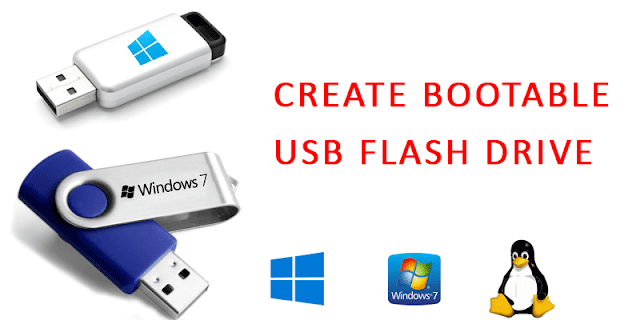
How To Make Bootable Usb Drive

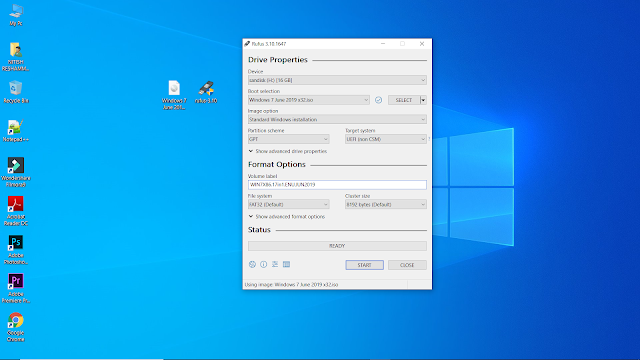
We Make Bootable Usb Drive With Rufus Softwere

Rufus is an open source software for creating bootable disk for many operating systems. its free so no money need. So lets get started.


  1. First download Rufus
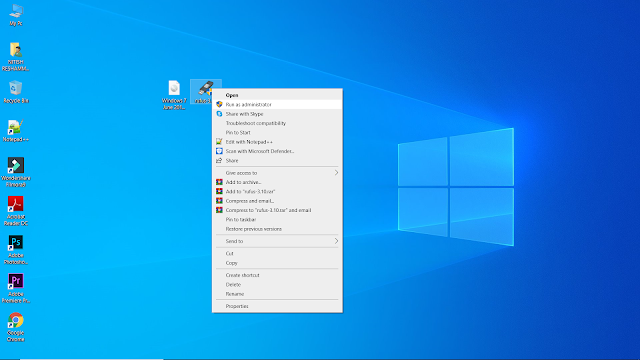
  2. Run As Administrator Rufus.exe
 
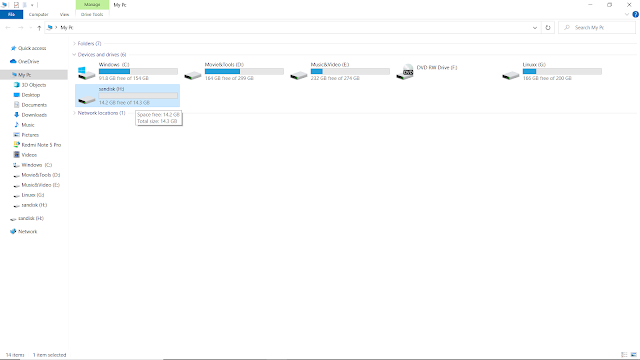
3. Insert an empty USB flash drive Minimum 8Gb
 
4. On Rufus click the disc icon or Select Disc Image File


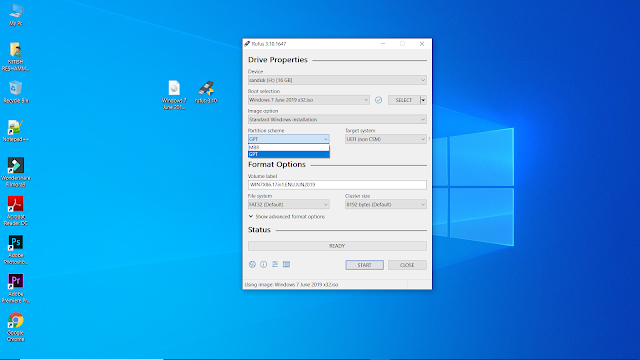
 5. Make You Sure Your Hadr-disk Partitation Is GPT Or MBR
     then You Select

 
6 .Click Start And Format Usb Drive

 
7.Clik Close 

 
8. Now Your Bootable Usb Drive Is Ready For Word


If You Have No Any Disk Image File Downlod Here


Windows 8.1 Home Pro

 Windows 8.1 Home Pro 4in1 JUNE 2020 Free Download

Windows 8.1 Pro Overview

Windows 8.1 was an extension of Windows 8 which was though very well organized Windows but was criticized by most of the users regarding it’s interface. Many people were perplexed about the start button as they had no idea what to do. Windows 8 was developed for the touch screen devices and due to this the desktop users suffered a lot. As a result loads of Desktop users rejected this edition of OS. Microsoft after sensing that the users are rejecting this OS in huge numbers comes with an extension i.e. Windows 8.1. Windows 8.1 has a great emphasis on the user interface. You can also download Windows 8.1 Home Pro 64 Bit ISO OEM Jan 2017.


Windows 8.1 since it’s release has come up in many different editions and the one we are discussing here is Windows 8.1 Home Pro 4in1 JUNE 2020. This update has been equipped with integrated .NET Framework 3.5 and 4.8. The security aspect has also been enhanced greatly with the addition of Diagnostics and Recovery Toolset 8.1. You can also download

Screenshot
Screenshot
Screenshot
Screenshot
Screenshot

[ RELEASE INFO ]

  • File: WIN81X86.4in1.ENU.JUN2020.iso
  • Size: 4,37GB
  • Format: Bootable ISO
  • SOURCES: dvd-6051550
  • CRC32: e49b3dbb
  • MD5 : bd1e151cf40be63e74f8e652edb65105
  • SHA-1: b882c17c6cd5b2d807eba8697ab628315ff11db3

[ CONTENTS ]

Integrated / Pre-installed:

  • NET Framework 3.5
  • NET Framework 4.8
  • Important & Security Only Updates – 2020-06-11
  • SetupComplete / Post-install:
  • Windows Defender Updates
  • LANGUAGE: ENGLISH US

[ EDITIONS INCLUDED ]

  • Windows 8.1 Home – STD
  • Windows 8.1 Home – KMS
  • Windows 8.1 Pro- – – STD
  • Windows 8.1 Pro- – – KMS
  • STD = Standard installation – For those with own License Key
  • KMS = Activated by KMS_VL_ALL

Features of Windows 8.1 Home Pro 4in1 JUNE 2020

Below are some noticeable features which you’ll experience after Windows 8.1 Home Pro 4in1 JUNE 2020 free download.

  • Has a great emphasis on security and stability.
  • Got an improved user interface.
  • Got integrated .NET Framework 3.5 and .NET Framework 4.8.
  • Got Windows 8.1 Home (STD, KMS) and Windows 8.1 Pro (STD, KMS) editions.
  • Got Diagnostics and Recovery Toolset 8.1.

Windows 8.1 Home Pro 4in1 JUNE 2020 Technical Setup Details

  • Software Full Name: Windows 8.1 Home Pro 4in1 JUNE 2020
  • Setup File Name:
  • WIN8.1X86.4in1.ENU.JUN2020.iso
  • WIN8.1X64.4in1.ENU.JUN2020.iso
  • Full Setup Size:
  • 4.4 GB, 4.3 GB
  • Setup Type: Offline Installer / Full Standalone Setup
  • Compatibility Architecture: 32 Bit (x86) / 64 Bit (x64)
  • Latest Version Release Added On: 19th Jun 2020
  • Developers: Windows

System Requirements For Windows 8.1 Home Pro 4in1 JUNE 2020

Before you start Windows 8.1 Home Pro 4in1 JUNE 2020 free download, make sure your PC meets minimum system requirements.

  • Memory (RAM): 1 GB of RAM required.
  • Hard Disk Space: 16 GB of free space required.
  • Processor: Intel Dual Core processor or later.

Windows 8.1 Home Pro 4in1 JUNE 2020 Free Download

Click on below button to start Windows 8.1 Home Pro 4in1 JUNE 2020 Free Download. This is complete offline installer and standalone setup for Windows 8.1 Home Pro 4in1 JUNE 2020. This would be compatible with both 32 bit and 64 bit windows.


Windows 7 All In One

Windows 7 All In One 
Windows 7 is a very famous and most widely used operating system all around the world. The reason behind it’s popularity is that it’s secure as well as stable. Windows OS was 1st introduced in the mid 80s and since then it has become the numero uno choice for all the masses. Windows 7 has come up in many editions and the one we are reviewing here is Windows 7 AIl in One 32 / 64 Bit Updated June 2019. You can also download


[ EDITIONS INCLUDED ]

  • Windows 7 Starter – – – – – – – – STD / DAZ / OEM
  • Windows 7 Home Basic – – – – STD / DAZ / OEM
  • Windows 7 Home Premium – STD / DAZ / OEM
  • Windows 7 Professional – – – -STD / DAZ / OEM
  • Windows 7 Enterprise – – – – – STD / KMS
  • Windows 7 Ultimate – – – – – – -STD / DAZ / OEM
Screenshot:
  1. Screenshots 
  2. Screenshots
  3. Screenshots
  4. Screenshots
  5. Screenshots
  6. Screenshots

Features of Windows 7 AIl in One 32 / 64 Bit Updated June 2019

Below are some noticeable features which you’ll experience after Windows 7 AIl in One 32 / 64 Bit Updated June 2019 free download.

  • A very famous and most widely used operating system all around the world.
  • Very stable and secure operating system.
  • Got .NET Framework 4.8.
  • Equipped with Internet Explorer 11 which will enhance your browsing experience.
  • Equipped with the Windows Defender updates
  • Supports the bootable USB 3.0.
  • Equipped with Diagnostic and Recovery Toolset 10.0.

Windows 7 AIl in One 32 / 64 Bit Updated June 2019 Technical Setup Details

  • Software Full Name: Windows 7 AIl in One 32 / 64 Bit Updated June 2019
  • Setup File Name: WIN7X86.17in1.ENU.JUN2019.iso, WIN7X64.14in1.ENU.JUN2019.iso
  • Full Setup Size: 2.8 GB, 3.5 GB
  • Setup Type: Offline Installer / Full Standalone Setup
  • Compatibility Architecture: 32 Bit (x86) / 64 Bit (x64)
  • Latest Version Release Added On: 12th July 2019
  • Developers: Windows

System Requirements For Windows 7 AIl in One 32 / 64 Bit Updated June 2019

Before you start Windows 7 AIl in One 32 / 64 Bit Updated June 2019 free download, make sure your PC meets minimum system requirements.

  • Memory (RAM): 1 GB of RAM required.
  • Hard Disk Space: 16 GB of free space required.
  • Processor: 1 GHz Intel Pentium processor or later.

Windows 7 AIl in One 32 / 64 Bit Updated June 2019 Free Download

Click on below button to start Windows 7 AIl in One 32 / 64 Bit Updated June 2019 Free Download. This is complete offline installer and standalone setup for Windows 7 AIl in One 32 / 64 Bit Updated June 2019. This would be compatible with both 32 bit and 64 bit windows.

Download 32bit

Download 64bit


Windows 10

 Windows 10 X64 X86 All Edition

Windows 10 is a very useful and impressive operating system that has been developed by Microsoft which is a famous name all around the globe because of it’s security and stability. This operating system was first introduced in mid 80s and since then it has become a household name and people are relying on this operating system for their official work.


Windows 10 .NET Framework 3.5. It has also got Diagnostic and Recovery Toolset 10 which will improve the security to a great degree. It has also been equipped with Microsoft Edge which will enhance the web browsing experience.

Screenshot
Screenshot
Screenshot
Screenshot

[ RELEASE INFO ]

  • File: 
  • Size: 4,99GB
  • Format: Bootable ISO
  • CRC32: d6c9f598
  • MD5 : d61cb2a7701300062b5501980c63faea
  • SHA-1: d7fad171483e94159f19e6d2452a3c380f28db3a

[ CONTENTS ]

Integrated / Pre-installed:

  • Office 2019 ProPlus VL 64bit
  • Servicing Stack Update:
  • KB4560366
  • CumulativeUpdate:
  • KB4557957
  • .NET Framework 3.5
  • Flash Player Security Update:
  • KB4561600
  • SetupComplete / Post-install:
  • Defender Updates
  • LANGUAGES: ENGLISH [US]

[ EDITIONS INCLUDED ]

  • Windows 10 Enterprise
  • Office 2019 ProPlus VL
  • Activators: KMS38 and Online KMS

[ FEATURES ]

  • UEFI-ready
  • (Use attached Rufus USB-tool to make UEFI-bootable)
  • Diagnostics and Recovery Toolset 10.0 (Microsoft DaRT)
  • install.wim compressed to recovery format (install.esd)

Features of Windows 10 

Below are some noticeable features which you’ll experience after Windows 10 X64 Enterprise 2004 JUNE 2020 free download.

  • An impressive operating system that has been developed by Microsoft.
  • Become a household name all around the globe due to it’s stability and security.
  • The operating system has been made more user friendly.
  • Got Diagnostics and Recovery Toolset 10.
  • Got Office 2019 ProPlus VL 64Bit.
  • Got .NET Framework 3.5.

Windows 10  Technical Setup Details

  • Software Full Name: Windows 10 
  • Setup File Name: 
  • Full Setup Size: 5 GB
  • Setup Type: Offline Installer / Full Standalone Setup
  • Compatibility Architecture: 64 Bit (x64)
  • Latest Version Release Added On: 14th Jun 2020
  • Developers: Windows

System Requirements For Windows 10

Before you start Windows 10 X64 Enterprise 2004 JUNE 2020 free download, make sure your PC meets minimum system requirements.

  • Memory (RAM): 2 GB of RAM required.
  • Hard Disk Space: 16 GB of free space required.
  • Processor: 1 GHz Intel Pentium processor or later.

Windows 10 Free Download

Click on below button to start Windows 10  Free Download. This is complete offline installer and standalone setup for Windows 10. This would be compatible with 64 bit windows.

x32

x64
Follow PC ZONE ARC